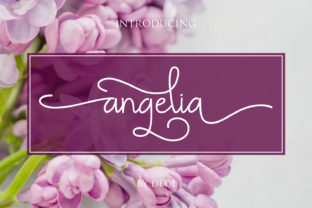
Angelia: A Handwritten Font That Elevates Brand Content
When you spend your days crafting scroll-stopping visuals for social feeds, landing pages, and campaign assets, you quickly learn that the right typeface can make or break a design. As a marketing specialist and content creator, I’ve tested dozens of script handwritten fonts. Some feel too decorative to read on mobile; others lack the personality needed to build a memorable brand identity. Angelia is a refreshing exception. This simply sweet handwritten font carries incredible style without sacrificing clarity, making it a versatile tool for anyone who produces digital content — from Instagram reels covers to YouTube thumbnails, email headers, and beyond.
Let’s explore how Angelia fits into a real marketing workflow, why it works for audience engagement, and how you can pair it with other fonts to create consistent, recognizable brand visuals.
What Makes Angelia a Standout Script Font
Angelia belongs to the Script Handwritten category, but it’s not your typical looping, overly ornate display font. Its strokes feel natural and approachable — think of a friendly hand note written with a fine-tip pen. The letterforms have a gentle rhythm, with a slight bounce that adds warmth without looking messy. This balance is exactly what you need when you want a human touch in your social media graphics or campaign visuals.
As a premium font, Angelia comes with clean kerning and consistent baseline alignment, which means you won’t waste time tweaking spacing for every headline. That’s a practical advantage when you’re producing multiple assets under tight deadlines. The font works beautifully at display sizes — ideal for short headlines, callouts, quotes, and accent text. Because it’s a handwritten font with legible character shapes, it also holds up on small screens, which is critical for fast-scrolling feeds on Instagram, TikTok, or Pinterest.
Audience Perception and First Impressions
Typography influences how people feel about your brand before they read a single word. Angelia’s style conveys sincerity, creativity, and a touch of playfulness. If you’re launching a product aimed at a younger, design-conscious audience, this script font signals that your brand values aesthetics and personality. For example, a beauty brand announcing a new skincare line could use Angelia in a teaser graphic — the handwritten feel suggests authenticity and care, which resonates well in the wellness space.
Similarly, if you’re a content creator building a personal brand, Angelia gives your thumbnails and reel covers a consistent, friendly voice. It helps your content feel less corporate and more approachable. That can directly impact click-through rates and engagement because viewers perceive a human connection.
Social Media Graphics and Feed Posts
Angelia shines in short-form content where you need to capture attention fast. Use it for:
- Inspirational quote graphics: The font’s natural rhythm makes motivational quotes feel handwritten, not machine-made. Pair it with a soft gradient background for a calming Instagram post.
- Sale announcements: “Flash Sale – 20% Off” set in Angelia across a bright banner feels urgent yet friendly. It works better than a rigid sans serif when you want to promote a limited-time offer without sounding aggressive.
- Product teasers: A single word like “Coming Soon” or “New” in Angelia adds curiosity. Combined with a clean product shot, it becomes a minimalist yet effective announcement.
YouTube Thumbnails and Reel Covers
Thumbnails are the most competitive real estate on YouTube. A strong display font like Angelia helps your title stand out in a crowded grid. Because the strokes are relatively thick and the loops are moderate, the text remains readable even at thumbnail size (typically around 1920×1080 but displayed at roughly 320 pixels wide).
For reel covers on Instagram, Angelia works for short phrases — “Study With Me,” “Recipe,” “Behind the Scenes.” The handwritten feel makes the cover look like a personal invitation, not a template. This can improve tap-through rates because the viewer anticipates a genuine experience.
Email Headers and Website Banners
Email marketing relies on scannable headers. Angelia can be used as a decorative headline at the top of a newsletter, especially for seasonal campaigns or product launches. However, keep it to one line — avoid long sentences. Combine it with a clean sans serif font for the body text to maintain readability across desktop and mobile.
For website banners, use Angelia sparingly — perhaps for a brand tagline or a promotion callout. Because it’s a creative font, it draws the eye immediately. That’s perfect for a hero section where you want visitors to pause, but don’t overuse it, or the design may look cluttered.
Campaign Visuals and Branded Templates
When you create repeatable templates for your social media or ads, Angelia can serve as the headline typeface across the series. For example, a weekly tip series on LinkedIn could use Angelia for the tip number or the key phrase, paired with a serif font for supporting text. This builds visual consistency without needing a full brand redesign.
Small business marketing teams benefit from this approach: one handwritten font unifies posts about sales, events, and behind-the-scenes content, making the brand instantly recognizable even before the logo appears.
Readability Considerations for Mobile and Thumbnails
No matter how beautiful a font is, it must remain functional. Angelia passes the mobile test. Its x-height is generous, and the ascenders and descenders don’t overlap dramatically. This means on a small screen, words like “Spring Sale” or “New Episode” stay decipherable.
That said, avoid using Angelia for long paragraphs. As a script font, its charm lies in brevity. Reserve it for headlines, callouts, names, and short phrases. In fast-scrolling feeds, a two- or three-word headline set in Angelia will register quickly. Full sentences should default to a supporting sans serif or serif font.
Strategic Font Pairing for Brand Consistency
Angelia pairs beautifully with minimal sans serifs like Montserrat, Open Sans, or Poppins. The contrast between a warm script and a clean, geometric sans looks modern and intentional. Use this combo for:
- Instagram carousel slides: Title in Angelia, body in a sans serif.
- Landing page hero sections: Main headline in Angelia, subheadline and body in sans.
- Digital ads (Facebook, Pinterest): Headline in Angelia, description in a thin sans serif.
For a more editorial or premium feel, pair Angelia with a classic serif like Playfair Display or Lora. The script provides the emotional hook, while the serif adds authority. This works well for webinar banners, online shop promotions, or lead magnet graphics (e.g., “Download Your Free Guide”).
If you are designing a logo or brand identity around Angelia, consider using it as the main name mark and a neutral sans as the secondary text. For packaging design or merchandise, Angelia can be the hero typeface, but ensure it remains legible when sized down for product labels.
When Angelia Works Best: Short Text and Accents
Angelia belongs in the category of display fonts — it’s built to be seen, not skimmed. Effective uses include:
- Sale callouts: “40% OFF”
- Seasonal phrases: “Winter Collection”
- Social media handles: “@yourhandle”
- Decorative accents: Drop cap for pull quotes
Avoid using Angelia for navigation menus, long descriptions, or any text that requires rapid scanning. That’s where a functional sans serif does the heavy lifting.
Licensing and Commercial Use
Before you embed Angelia in templates, ad creatives, or digital products, review the commercial licensing. Like most premium script fonts, Angelia typically requires a license for use in:
- Client campaigns or client-owned marketing materials
- Commercial YouTube videos and monetized content
- Merchandise (t-shirts, mugs, etc.)
- Digital products sold on platforms like Etsy or Gumroad
- Websites and apps (web font embedding)
Always check the exact terms from the foundry. Investing in a proper license protects your work and supports the type designer. For a marketer or brand manager, it also ensures you can scale usage across campaigns without legal headaches.
Bringing Angelia into Your Creative Workflow
Adding Angelia to your font library is straightforward. Download the file, install it, and it will appear in your usual design tools — Canva, Adobe Illustrator, Photoshop, Figma, or even Microsoft Office. Because it’s a modern typography asset, it integrates easily into templates you already use.
Start by testing it in one application: a single Instagram post or a YouTube thumbnail. See how it changes the tone. Most creators find that Angelia instantly lifts the visual, making the content feel more curated. From there, you can expand to a full template system for your brand identity.
Angelia is more than just a pretty handwritten font — it’s a strategic asset for marketers who understand that every pixel influences perception. By using it thoughtfully, you’ll create scroll-stopping visuals that feel personal, professional, and memorable.